Collaboration, connection and culture
This reimagination of what a calendar app could be is rooted in how these 3 aspects touch events in our lives. The idea started with etiquette – how can I discreetly check if I should be wrapping up the meeting?
From there, I decided to explore ways to cover some niche needs that users may want to be covered in a calendar app.
My high-level goals were:
- collaboration – what features can help individuals work together more easily in the digital age?
- connection – how can I make the experience better for those who are neurodiverse?
- culture – are there ways I can make the calendar app more useful across cultures and religions?
So far, I’ve only had limited opportunities to use Figma as a copywriter/UX writer. This project was the perfect chance to do some hands-on learning.
Built with inclusion in mind
Let users design their own experience
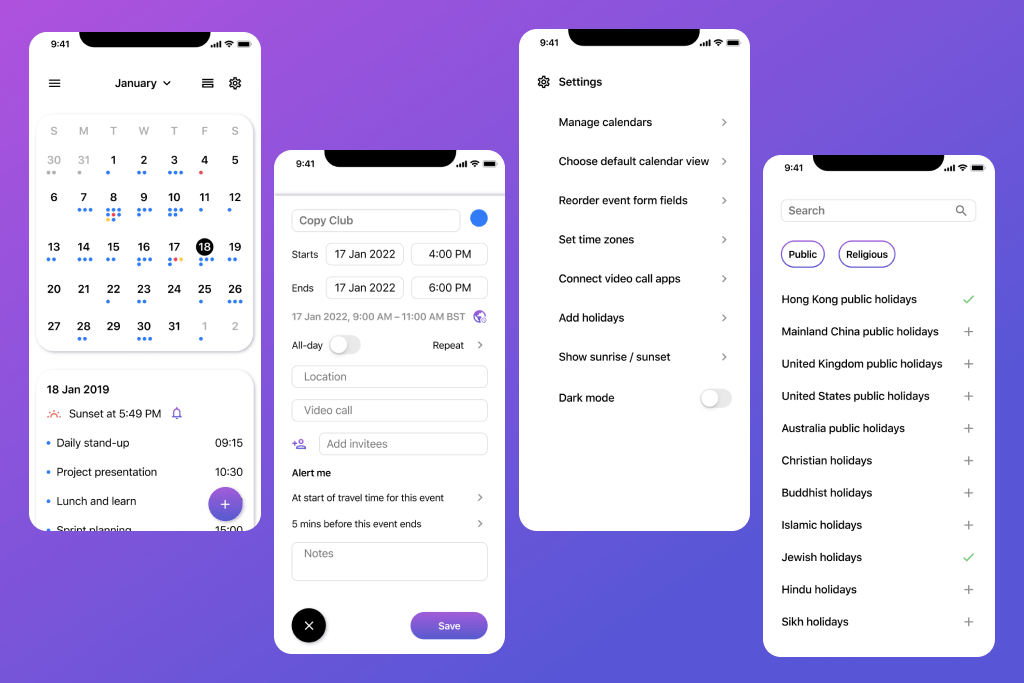
Too many colours can be overwhelming for neurodivergent users. So I chose a mostly neutral palette throughout the app, with pops of colour for components that need to stand out. Users can pick their preferred colours for different calendars – monochromatic colour options could also be offered. And of course, the overall palette also makes it easy for the calendar app to offer dark mode to users who prefer it.
Everyone may have different ideas of how the event fields should be ordered. Some might want to note down the location first; others the date and time. To accommodate the user rather than force them to conform to the design, the app could let users reorder these fields in the settings.
While some users may prefer to open the app to see a more traditional calendar layout, others may prefer to see a timeline they can scroll through. Users can toggle to the other view on the screen, or change the default calendar view they’ll see when they next open the app.
Make productivity and etiquette easy
The current iOS Calendar app doesn’t show users how packed their schedule is at a glance when they view the calendar as a month. On the other end of the extreme, the Google Calendar app can look quite crammed if they have many events on it! As a compromise between the two, I used dots – which will correspond with the colour of the calendar the event is on – below the date. That way, users can check which days they’re more busy or free without having to navigate through each day or week.
Neither calendar makes it easy for users to check if the event is scheduled at an appropriate time for overseas attendees. Often, the user would have to be conscientious enough to look up the time zones themselves. I think this could be solved by either:
- letting the user add the time zones they frequently have to take note of in the settings so the time zones show up when they’re creating an event
- letting the user add invitees and then the time zones could be populated on the screen based on the location set in the invitees’ profiles.
It would also be great if users could connect the video call apps that they use – such as Zoom, Skype, Duo or Teams – to the calendar. That way, any calls scheduled in those apps can be reflected in the calendar app automatically. The user would also be able to follow the meeting link for the event in the calendar app to open the right video call app and start their meetings promptly.
Users could also set an alert for when the event is ending. This lets them know when to start wrapping up a meeting without having to look at their phone.
Celebrate culture in a digital age
Different cultures and religions may use calendars other than the standard Gregorian calendar. So I wanted to make sure those were considered in the calendar app. Besides standard public holidays, calendars for different cultures, religions and interests (e.g. moon phases) were included.
These calendars should also reflect time-sensitive customs associated with them, if any. For example, Muslims pray 5 times a day in the month of Ramadan, and Jews light the Shabbat candles 18 minutes before sunset on Fridays. In both examples, a timely alert could be helpful.
Further areas of exploration
Expanding on this exercise in ideation, I think it would be interesting to test if suggesting invitees that the user frequently invite to their events would be a useful feature.
Similarly, there’s the question of whether the calendar app should have ‘phone call’ as an option as some users may still use that instead of video call apps.
All in all, there are still many ways we could improve an app that is so integral to our lives.
 Winnie Choi