We generally think of community management for social media channels such as Facebook, Instagram and Twitter. However, app stores also provide an opportunity for us to engage with our customers – one that many brands don’t seize.
What is community management?
Shopify summed it up best on their blog – “Community management, at its core, is about relationships and how your brand seizes opportunities to interact with your community in public online spaces.”
When done well, community management helps foster brand loyalty.
Will it give us a 5-star rating and #1 ranking?
App stores generally take the following into account when they rank apps:
- Downloads – how many people have downloaded this app?
- App starts – how many people open this app regularly?
- Keyword relevance – does the app do what it says it does?
- Update frequency – how often does this app update itself?
- Update quality – are these updates actually helpful for its users?
- Retention – do users remain active users on this app?
- Social proof and backlinks – do people talk about this app?
- Number of reviews – how many reviews does this app have?
- Value of reviews – how do users rate this app?
The short answer is that community management won’t work miracles for your app, but it will help you move towards your goal of a higher rating and ranking.
So why do we need it?
Community management shows our customers that we’re actively listening to them. Everyone wants to be heard, and we should be paying attention to what our customers are saying. It helps us to manage any complaints and issues that our customers are facing so we can address them as quickly as possible. App store customer reviews also serve as a valuable source of firsthand feedback, initiated by users themselves.
Overall, when it’s done well, community management helps us to build a more positive brand image and foster stronger brand loyalty.
How I did it at PayMe
The main tools that I had at my immediate disposal were Excel and Confluence. The Product Owner also added me to the Google Play Console and iTunes Connect accounts so I can access the reviews.
I used Excel to catalogue and analyse the reviews. The information I tracked for each review included the date, month, operating system, app version, rating, username, category, sentiment, language, and the feedback in the user’s own words. I also had columns for our responses, who approved the response and whether we’ve published the response. Having all of these data points helped me to:
- find reviews easily
- track feedback on the different app versions
- gauge the current sentiment around our app
- see which issues need to be prioritised by our team
- track the approval and publishing process
Here’s what my community management dashboard looked like:
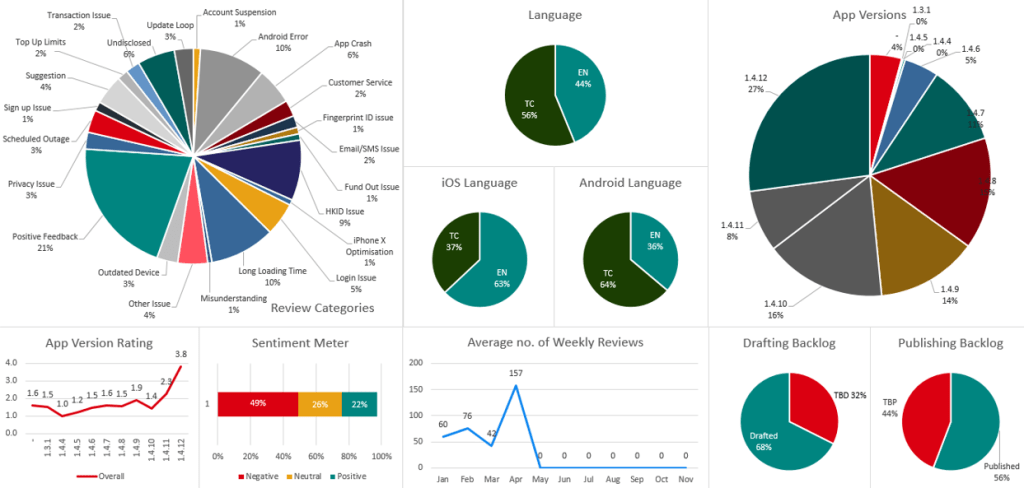
Since these items are calculated using Excel formulae, all I need to do is update the sheet that records the reviews. The dashboard updates itself automatically.
I generally checked for new reviews everyday, and presented my dashboard to the PayMe team at our weekly meetings. Representatives from IT, Product and Customer Support teams would be present, so it made it a lot easier to work out a response that our users would find helpful. I would draft up a few versions of a response, and once they’ve been approved, I publish them.
Setting community management guidelines
Most reviews can be categorised as positive, neutral or negative. It’s important for brands to decide how they want to manage these different sentiments. As an example:
We do not engage with:
- troll comments
- abusive, offensive, sexually suggestive or politically charged comments
We wait to engage with:
- items that are still pending confirmation
- items that touch on yet-to-be-released information
We actively engage with:
- positive reviews
- suggestions
- items that are public knowledge
It’s important to note that sometimes, the best response is simply no response. Some users just aren’t interested in a constructive dialogue. Should you delete reviews even if they’re troll comments? Personally, I wouldn’t – abusive reviews reflect more on the user than on the brand.
I also recommend keeping the following in mind when you create responses for community management:
- Create good feedback loops – make sure that the solutions you propose work
- Don’t be afraid to say sorry and to admit that there’s room for improvement
- Keep your replies human, intelligent and simple
- Stay calm and remain positive
Canned responses: yay or nay?
When asked “What makes you feel like your opinion is valued” in a customer survey:
- 68% said it was seeing a change that reflected their feedback
- 63% said it was receiving a personalised response
- 44% said it was discussing their feedback with the brand
- 10% said it was receiving an automated response
If we want our customers to feel heard, we should avoid canned responses. That’s why it’s important to have tailored replies to the reviews they leave in the app stores. Of course, it can be difficult to create a unique answer to every single review so I would suggest preparing multiple versions of a response. The underlying message should remain the same, but you can vary the wording so it seems less canned.
We should also read the reviews carefully. Users may sometimes list more than one issue in their review and our responses should aim to answer as many of them as possible.
From haters to fans
Is it actually possible to turn 1-star reviewers into your champions, just through community management? The answer is yes, as long as you follow through with your actions. If your team promises a fix, they should deliver a fix.
Users may forget that they left you a poor review because of a bug they faced in the app. But if you reply to them to let them know you’re aware of the issue and have fixed it since, they might come back to edit their review and give you a few more stars.
 Winnie Choi